
Clock
Reminders that pop up on your computer screen
Type a reminder, pick a time, and when it comes due your browser shows a notification while your DashSuey board is open in a tab. The list is saved to your account, so it is there on every computer you sign in on.
- Needs
- Nothing to install. Allow alerts once.
- Alerts
- While your board is open in a browser tab
- Shows
- On every computer you sign in on
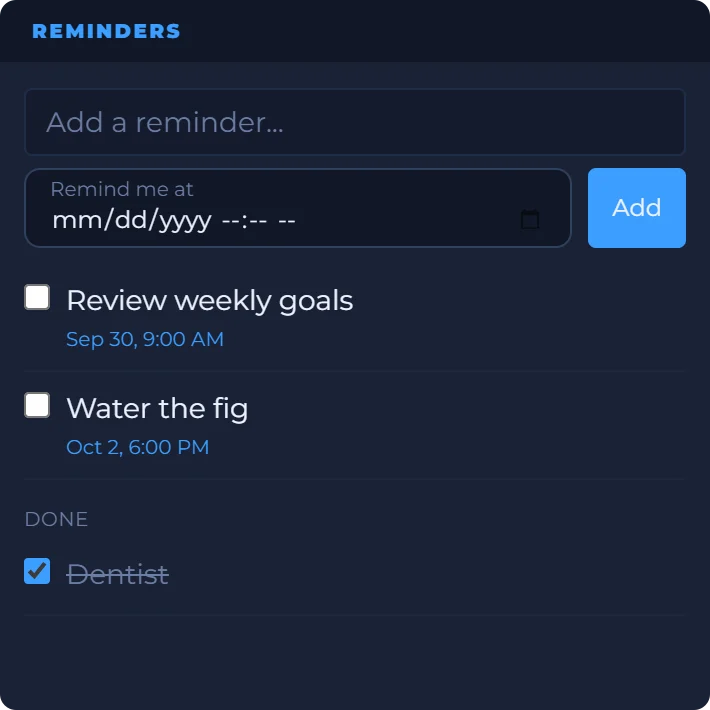
On your board, next to the rest of your day
Reminders beside a clock, today's date and a countdown to Friday evening. The board is saved to your account, so your reminders are there on the work laptop and the computer at home.
Date
Count Down
Year Dots
The Reminders tile is an example capture; the others are live in your browser.
How it reminds you
- Add
- Type the reminder, pick a date and time if you want one, and press Enter or Add.
- The alert
- When the time comes, your browser shows a notification with the reminder's text, and the tile marks it due. Click Turn on alerts once to let the browser show them.
- When it can alert
- While your DashSuey board is open in a browser tab, even behind other tabs. With every board closed, nothing alerts.
- Missed ones
- A reminder that came due while no board was open alerts once when you next open one, if it is less than a day late. Older ones are marked due on the tile.
- Done
- Tick a reminder and it moves under Done. The x deletes it.
- Where it lives
- On your account, with your board, on every computer you sign in on. A board already open elsewhere shows new reminders when it reloads.
Where the alert comes from
Your browser. DashSuey keeps the list on your account, and the board you have open checks it as the time comes. It uses your browser's own notifications, so you allow them once per browser, and you can turn them off in the browser's settings.
There is no app to install and no email or phone push, which is why a board needs to be open somewhere. Make it your browser's start page, or keep it in a pinned tab, and it is always open.
What it does not do
- It can't alert with every board closed, and it sends no email or text.
- It has no repeating reminders, snooze or sound of its own.
- It isn't a phone app. DashSuey has no mobile app.
Questions people ask
How do I put a reminder on my computer screen?
Add the Reminders widget to your DashSuey board, type the reminder and pick a time. When it comes due, your browser shows a notification, as long as your board is open in a tab. Allow alerts once when the widget asks.
Will it remind me if the browser is closed?
No. The alert comes from a DashSuey board open in your browser, in any tab. If every board is closed, nothing alerts; a reminder that came due in the meantime alerts once when you next open your board, if it is less than a day late.
Do I need to install anything?
No. DashSuey is a web page you sign into, and the alerts are your browser's own notifications. It isn't a browser extension, and there's no mobile app.
Will my reminders be on my other computer?
Yes. They are saved to your DashSuey account, so they are there on every computer you sign in on. Each browser asks once for permission to show alerts.
Why am I not getting alerts?
Check that your board is open in a tab, and that alerts are allowed for DashSuey in your browser's site settings. If they are blocked, the widget says so, and due reminders still show on the tile.
Can a reminder repeat every day?
No. Each reminder is for one date and time. Add another for the next time.
Can I use it without a time?
Yes. A reminder with no time just sits on the list until you tick it off.
Does it work on a Mac?
Yes. It runs in the browser, so it works the same on a Mac, a Windows PC or a Chromebook, with the alerts your browser shows there.